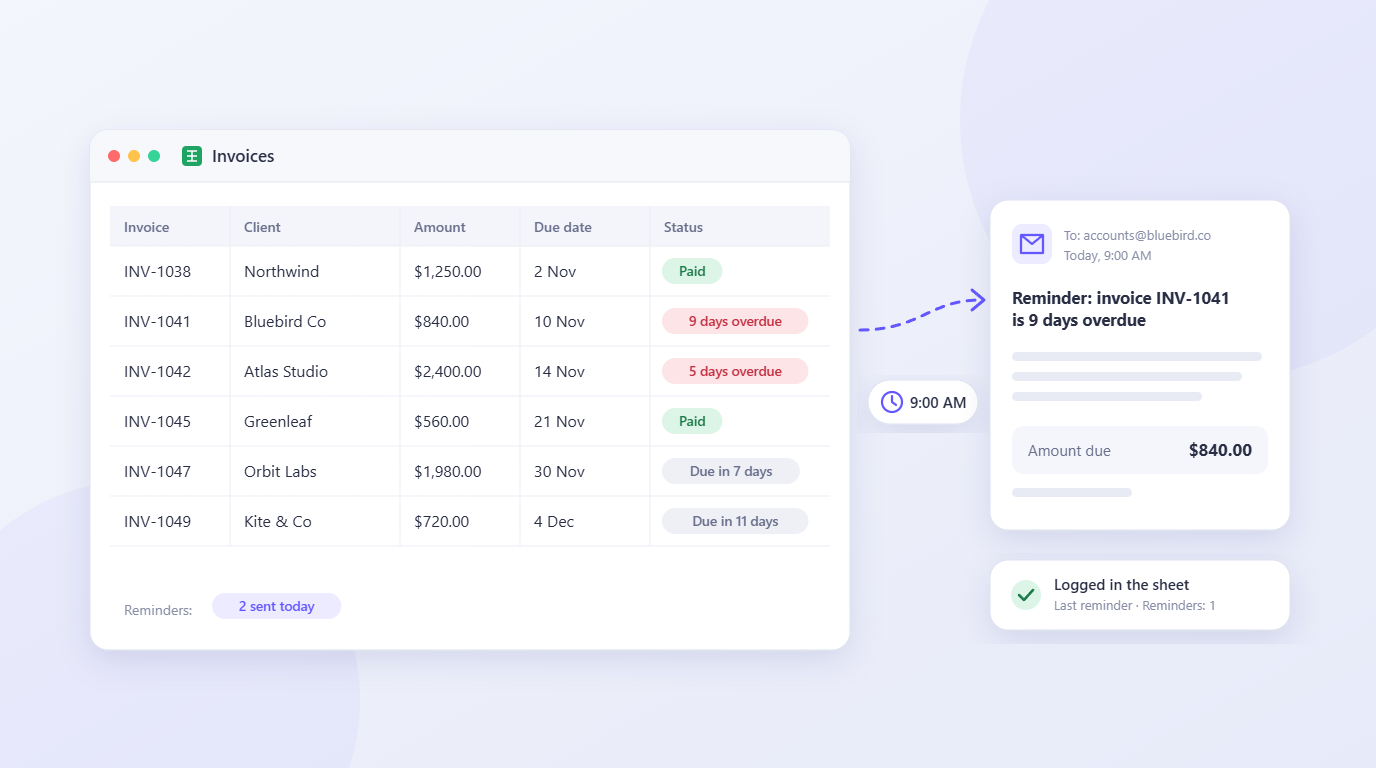
Chasing late payments is the job nobody wants, so it slips. This script does it for you: every morning it checks your invoice sheet and emails a short, polite reminder for each unpaid invoice that is past its due date.
What the script does
- Reads your invoice sheet and matches the columns by their headings, so the column order does not matter.
- Picks out invoices that are past their due date and not marked as paid (Yes, Paid, x or a ticked checkbox).
- Emails the client a short reminder with the invoice number, amount and due date, sent from your own Gmail.
- Writes the date and the number of reminders back into the sheet, sends at most one a week per invoice and stops after three.
The code and how to set it up
Overdue invoice reminders from Google Sheets
Emails a polite reminder for every unpaid invoice that is past its due date, at most once a week, and logs each reminder in the sheet.
/**
 * Overdue invoice reminders from Google Sheets
 * Emails a polite reminder for every unpaid invoice that is past its due date,
 * at most once every few days, and writes the date and count back into the sheet.
 *
 * Set-up (once):
 * 1. Row 1 of the first sheet needs these headings (any order):
 *    Invoice, Client, Email, Amount, Due date, Paid
 *    The columns "Last reminder" and "Reminders" are added for you.
 * 2. Change the settings below.
 * 3. Run install() once and approve the permissions. It then checks every morning.
 */
const YOUR_NAME = 'Your Company';
const CURRENCY = '$';
const REMIND_EVERY_DAYS = 7; // days between two reminders for the same invoice
const MAX_REMINDERS = 3;     // stop after this many
const TEST_MODE = false;     // true = every reminder goes to you instead of the client

/** Run once: checks now, then every morning around 9. */
function install() {
  ScriptApp.getProjectTriggers().forEach(function (t) { ScriptApp.deleteTrigger(t); });
  ScriptApp.newTrigger('sendReminders').timeBased().everyDays(1).atHour(9).create();
  sendReminders();
}

function sendReminders() {
  const sheet = SpreadsheetApp.getActiveSpreadsheet().getSheets()[0];
  const rows = sheet.getDataRange().getValues();
  const col = columns(sheet, rows[0]);
  const get = function (row, name) { const v = row[col[name]]; return v === undefined ? '' : v; };
  const zone = Session.getScriptTimeZone();
  const me = Session.getEffectiveUser().getEmail();
  const today = new Date();
  today.setHours(0, 0, 0, 0);
  let sent = 0;

  for (let r = 1; r < rows.length; r++) {
    const row = rows[r];
    const email = String(get(row, 'Email')).trim();
    const due = get(row, 'Due date');
    const paid = String(get(row, 'Paid')).trim().toLowerCase();
    const count = Number(get(row, 'Reminders')) || 0;
    const last = get(row, 'Last reminder');
    if (!email || !(due instanceof Date)) continue;
    if (['yes', 'y', 'paid', 'true', 'x'].indexOf(paid) !== -1) continue;
    if (due >= today || count >= MAX_REMINDERS) continue;
    if (last instanceof Date && (today - last) / 86400000 < REMIND_EVERY_DAYS) continue;
    if (MailApp.getRemainingDailyQuota() < 1) break;

    const days = Math.round((today - due) / 86400000);
    const amount = get(row, 'Amount');
    const money = typeof amount === 'number' ? CURRENCY + amount.toFixed(2) : String(amount);
    const invoice = get(row, 'Invoice');
    const body = 'Hi ' + (get(row, 'Client') || 'there') + ',\n\n'
      + 'A quick reminder that invoice ' + invoice + ' for ' + money + ' was due on '
      + Utilities.formatDate(due, zone, 'd MMMM yyyy') + '.\n'
      + 'If you have already paid, thank you, and please ignore this email.\n\n'
      + 'Best regards,\n' + YOUR_NAME;
    MailApp.sendEmail({
      to: TEST_MODE ? me : email,
      subject: 'Reminder: invoice ' + invoice + ' is ' + days + ' day' + (days === 1 ? '' : 's') + ' overdue',
      body: body,
      name: YOUR_NAME,
    });
    sheet.getRange(r + 1, col['Last reminder'] + 1).setValue(today);
    sheet.getRange(r + 1, col['Reminders'] + 1).setValue(count + 1);
    sent++;
  }
  console.log(sent + ' reminder(s) sent');
}

/** Finds each column by its heading and adds the tracking columns when they are missing. */
function columns(sheet, header) {
  const col = {};
  header.forEach(function (h, i) { col[String(h).trim()] = i; });
  ['Invoice', 'Email', 'Amount', 'Due date'].forEach(function (name) {
    if (!(name in col)) throw new Error('Add a column with the heading "' + name + '" to row 1.');
  });
  ['Client', 'Paid', 'Last reminder', 'Reminders'].forEach(function (name) {
    if (name in col) return;
    col[name] = sheet.getLastColumn();
    sheet.getRange(1, col[name] + 1).setValue(name);
  });
  return col;
}- Open the Google Sheet with your invoices. Row 1 needs the headings Invoice, Client, Email, Amount, Due date and Paid.
- Click Extensions > Apps Script, delete what is there and paste the code.
- Change YOUR_NAME and CURRENCY at the top. For a first try, set TEST_MODE to true so every reminder goes to you instead of the client.
- Run the install function once and approve the permissions. It then checks every morning around 9.
Good to know
- Mark an invoice as paid and its reminders stop at once.
- A free Gmail account can send about 100 emails a day from scripts and a Google Workspace account about 1,500, which is plenty for reminders.
- Change the wording of the email inside sendReminders, for example to add your bank details or a payment link.
- Everything runs inside your own Google account. Nothing is sent to us.
Want it adapted?
We write Apps Script for businesses that run on Google Workspace. If you need other columns, another trigger or a different tool at the other end, tell us what the script should do.