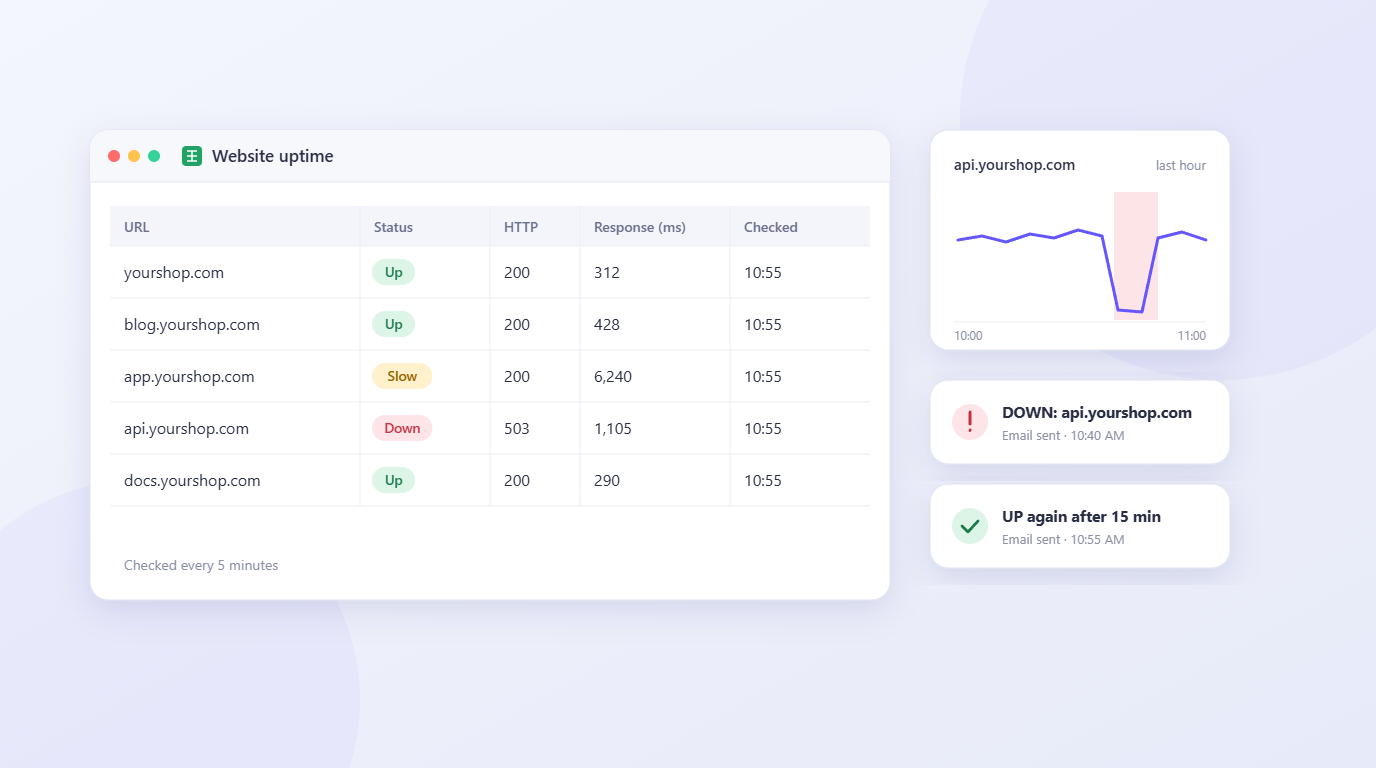
You should not hear that your website is down from a customer. This script turns a Google Sheet into a simple uptime monitor: it checks your sites every five minutes, emails you when one stops responding, and again when it is back.
What the script does
- Opens each website in the list every five minutes, the way a browser would, following redirects.
- Writes the result next to each site: Up, Slow or Down, the HTTP code, the response time and when it was checked, coloured green, yellow or red.
- Emails you after two failed checks in a row, so a single hiccup does not wake you up.
- Emails you again when the site is back, with roughly how long it was down.
The code and how to set it up
Website uptime monitor in Google Sheets
Checks your websites every five minutes, writes the status and response time into a sheet, and emails you when a site goes down and when it is back.
/**
 * Website uptime monitor in Google Sheets
 * Checks a list of websites every 5 minutes, writes the status and response time into the sheet,
 * and emails you when a site goes down and again when it is back up.
 *
 * Set-up (once):
 * 1. In the first sheet, type URL in cell A1 and put one website per row below it.
 * 2. Change the settings below if you like.
 * 3. Run install() once and approve the permissions. It then checks every 5 minutes.
 */
const ALERT_EMAIL = '';       // empty = your own address, or for example 'team@yourcompany.com'
const SLOW_MS = 5000;         // slower than this (in milliseconds) shows as "Slow"
const FAILS_BEFORE_ALERT = 2; // failed checks in a row before you get an email

const HEAD = ['URL', 'Status', 'HTTP code', 'Response (ms)', 'Last checked', 'Down since', 'Fails'];

/** Run once: checks now, then every 5 minutes. */
function install() {
  ScriptApp.getProjectTriggers().forEach(function (t) { ScriptApp.deleteTrigger(t); });
  ScriptApp.newTrigger('checkSites').timeBased().everyMinutes(5).create();
  checkSites();
}

function checkSites() {
  const sheet = SpreadsheetApp.getActiveSpreadsheet().getSheets()[0];
  sheet.getRange(1, 1, 1, HEAD.length).setValues([HEAD]).setFontWeight('bold');
  if (sheet.getLastRow() < 2) return;
  const range = sheet.getRange(2, 1, sheet.getLastRow() - 1, HEAD.length);
  const rows = range.getValues();
  const to = ALERT_EMAIL || Session.getEffectiveUser().getEmail();
  const now = new Date();

  rows.forEach(function (row) {
    let url = String(row[0]).trim();
    if (!url) return;
    if (!/^https?:\/\//i.test(url)) url = 'https://' + url;
    const before = Number(row[6]) || 0;
    let code = 0, error = '';
    const start = Date.now();
    try {
      code = UrlFetchApp.fetch(url, { muteHttpExceptions: true, followRedirects: true }).getResponseCode();
    } catch (e) {
      error = String(e.message || e).slice(0, 100);
    }
    const ms = Date.now() - start;
    const up = !error && code < 400;
    const fails = up ? 0 : before + 1;

    row[1] = up ? (ms > SLOW_MS ? 'Slow' : 'Up') : 'Down';
    row[2] = code || error;
    row[3] = ms;
    row[4] = now;
    row[6] = fails;
    if (fails === 1) row[5] = now;

    if (fails === FAILS_BEFORE_ALERT) {
      MailApp.sendEmail(to, 'DOWN: ' + url,
        url + ' is not responding.\n\nResult: ' + (code || error) + '\nChecked: ' + now
        + '\n\nYou will get another email when it is back up.');
    }
    if (up && before >= FAILS_BEFORE_ALERT) {
      const mins = row[5] instanceof Date ? Math.round((now - row[5]) / 60000) : 0;
      MailApp.sendEmail(to, 'UP again: ' + url,
        url + ' is back up after about ' + mins + ' minutes.\n\nResponse: ' + code + ' in ' + ms + ' ms.');
    }
    if (up) row[5] = '';
  });

  range.setValues(rows);
  sheet.getRange(2, 2, rows.length, 1).setBackgrounds(rows.map(function (row) {
    return [row[1] === 'Down' ? '#f8d7da' : row[1] === 'Slow' ? '#fff3cd' : row[1] === 'Up' ? '#d4edda' : null];
  }));
}- Create a new Google Sheet. Type URL in cell A1 and put one website per row below it.
- Click Extensions > Apps Script, delete what is there and paste the code.
- Optional: put a team address in ALERT_EMAIL. Left empty, the alerts go to you.
- Run the install function once and approve the permissions. It then checks every five minutes.
Good to know
- It suits up to about 20 sites, because one run has to finish within the six-minute limit Google sets for scripts.
- The checks come from Google servers, so a site that blocks them, or one that only works inside your office network, shows as Down.
- Change SLOW_MS to decide what counts as slow, and FAILS_BEFORE_ALERT to get alerts sooner or later.
- Everything runs inside your own Google account. Nothing is sent to us.
Want it adapted?
We write Apps Script for businesses that run on Google Workspace. If you need other columns, another trigger or a different tool at the other end, tell us what the script should do.