Outlook down again? On November 12, 2026, millions of people opened Outlook and saw nothing load during a global Microsoft 365 outage. Emails wouldn’t send, mailboxes wouldn’t open, and Teams calendars went blank. Within hours, Downdetector had logged more than 130,000 Outlook reports, with problems reported in at least 74 countries.
It wasn’t the first time this year. It was Microsoft 365’s third major email disruption of 2026. If your business runs on Outlook, the useful questions go beyond “is it down?” You need to know why it keeps happening, how one problem spreads to everything else, when it actually gets fixed, and what you can do so your business keeps running next time.
This guide answers all four, in plain language.
Microsoft 365 outage November 2026: what happened
The outage hit Exchange Online, the cloud service that runs Outlook mailboxes for Microsoft 365. Here’s how it unfolded, based on Microsoft’s status updates as reported by UptimeRobot, TechRadar and Computerworld (times in UTC):
| When (UTC) | What happened |
|---|---|
| Nov 12, 16:17 | Microsoft opens an Exchange Online incident. Users can’t connect to mailboxes through Outlook on the web, Outlook desktop, mobile (ActiveSync) or REST. |
| Nov 12, 18:26 | A broader incident is opened for Microsoft 365 services that depend on Exchange, including Teams calendars, Copilot Chat, SharePoint, Purview, Defender and admin pages. |
| Nov 12, evening | Third-party services report knock-on failures. Help desks, email APIs and AI connectors that read Microsoft mailboxes all report errors. |
| Overnight | Microsoft reverts a recent network configuration change, tests fixes and restarts servers. Reports drop, then rise again as Europe and Asia start work. |
| Nov 13, 07:29 | Microsoft reports “positive results for server stability” after patching part of its infrastructure. |
| Nov 13, ~18:00 | Broad recovery is announced. Mail queues are “approaching normal levels,” but dependent services are still catching up. |
| Nov 14 | Microsoft continues to monitor stability and the email backlog. A full post-incident report is promised. |
Microsoft’s own impact window ran from 10:05 UTC on November 12 to 16:10 UTC on November 13, about 30 hours. Not every organisation was down for that long. Impact varied by region and tenant.
Was it a cyberattack? No. Microsoft said it found no evidence of malicious activity and called it “a technical issue not related to cyber or AI / agents.”
Not a one-off: Microsoft 365’s recent outage record
| Date | What broke | Stated cause |
|---|---|---|
| Oct 29, 2025 | Azure, Microsoft 365, Outlook on the web, admin portals, Xbox, Minecraft | An inadvertent configuration change in Azure Front Door, Microsoft’s global edge network |
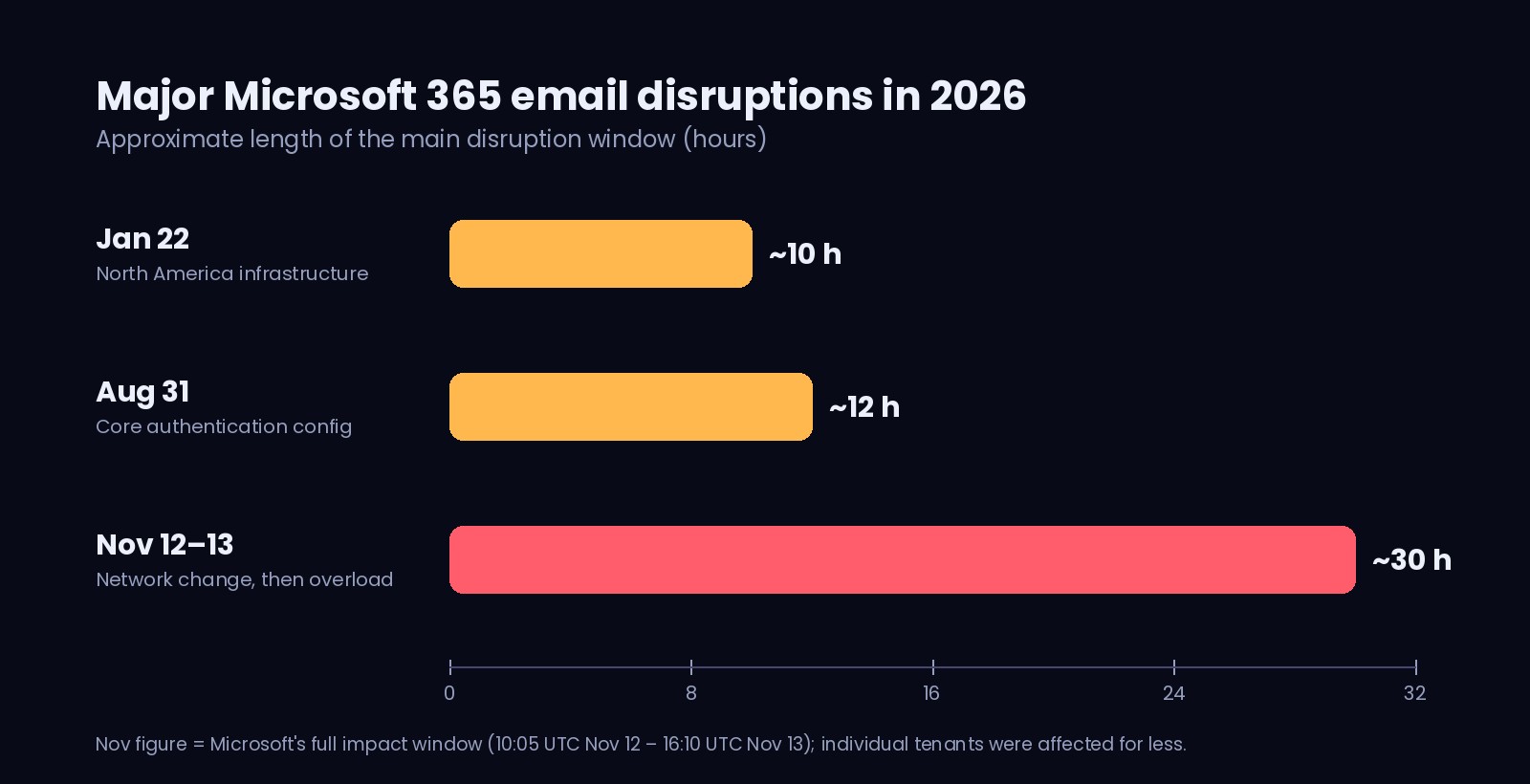
| Jan 22, 2026 | Outlook, Defender, Purview (~10 hours, about 15,000 Downdetector reports) | Part of the North American infrastructure “not processing traffic as expected” |
| Aug 31, 2026 | Outlook, OneDrive, SharePoint, Teams search and calendar (~12 hours) | A problem in a core authentication configuration shared by several Microsoft 365 services |
| Nov 12–13, 2026 | Exchange Online plus every service that depends on it (~30-hour impact window) | An earlier network capacity upgrade that surfaced after a later network change and overloaded the remaining servers |
Notice the pattern. None of these were hacks, and none started with a hardware failure. Each one began with a change: a configuration update, an authentication setting, a network upgrade.
Why is Outlook down? The 4 real causes of Microsoft 365 outages
Microsoft runs one of the largest cloud platforms in the world, so why does it keep stumbling? At this scale, the main risk isn’t servers breaking. It’s people and automation changing things. Most cloud outages come from four root causes.
1. Configuration and network changes
Microsoft deploys thousands of changes every day. Most go out gradually, but a bad setting in a global component, such as the network edge, routing, or the authentication layer, can reach everywhere at once. The October 2025 Azure Front Door outage and the November 2026 Exchange outage both trace back to network changes.
2. Shared dependencies
Outlook isn’t a standalone app. It sits on top of shared services for sign-in (Microsoft Entra ID), networking, storage and Exchange itself. When a shared layer fails, every product built on it fails too. That’s why the August 2026 authentication problem took down email, OneDrive, SharePoint and Teams together.
3. Capacity and overload
Cloud systems are sized for normal demand plus some headroom. If part of the fleet goes offline, the survivors have to absorb its traffic. If they can’t, they fail too, and the failure spreads like falling dominoes.
4. Automation that makes things worse
Health checks and auto-healing systems are meant to remove sick servers. Under unusual conditions they can remove healthy ones too, shrinking capacity at exactly the wrong moment. That’s part of what happened in November.
How one Microsoft outage spreads: the cascade effect
Engineers call this a cascading failure. One problem triggers the next until users everywhere are affected. Based on Microsoft’s updates, here’s a simplified view of the November chain reaction:
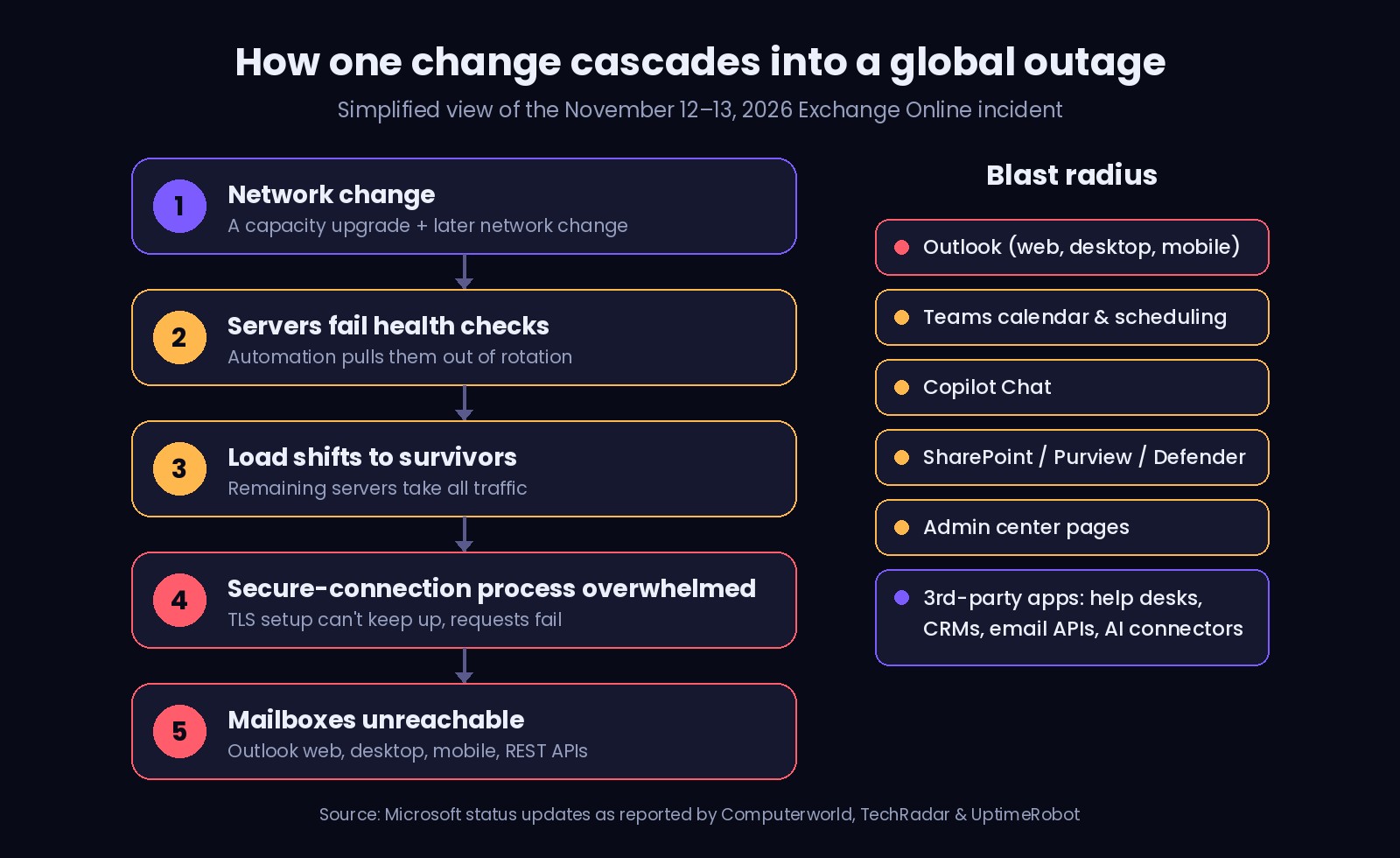
- A network change exposed a hidden problem from an earlier capacity upgrade.
- Servers failed automated health checks and were taken out of service.
- Load shifted to the remaining servers. Microsoft was clear that traffic didn’t increase. Capacity shrank.
- The process that sets up secure connections was overwhelmed, so those servers stopped answering requests as well.
- Mailboxes became unreachable from every connection method: web, desktop, mobile and API.
Why your other tools broke too
This is where an outage spreads to your business. Many tools you use every day quietly depend on Microsoft 365: help desks that turn emails into tickets, CRMs that sync your inbox, email-sending APIs, scheduling tools and AI assistants that read your mail. In November, Zendesk, Twilio and Anthropic each reported problems with their Microsoft integrations. Your own systems can look fine and still fail because they depend on Exchange.
When will Outlook be fixed? Why recovery takes so long
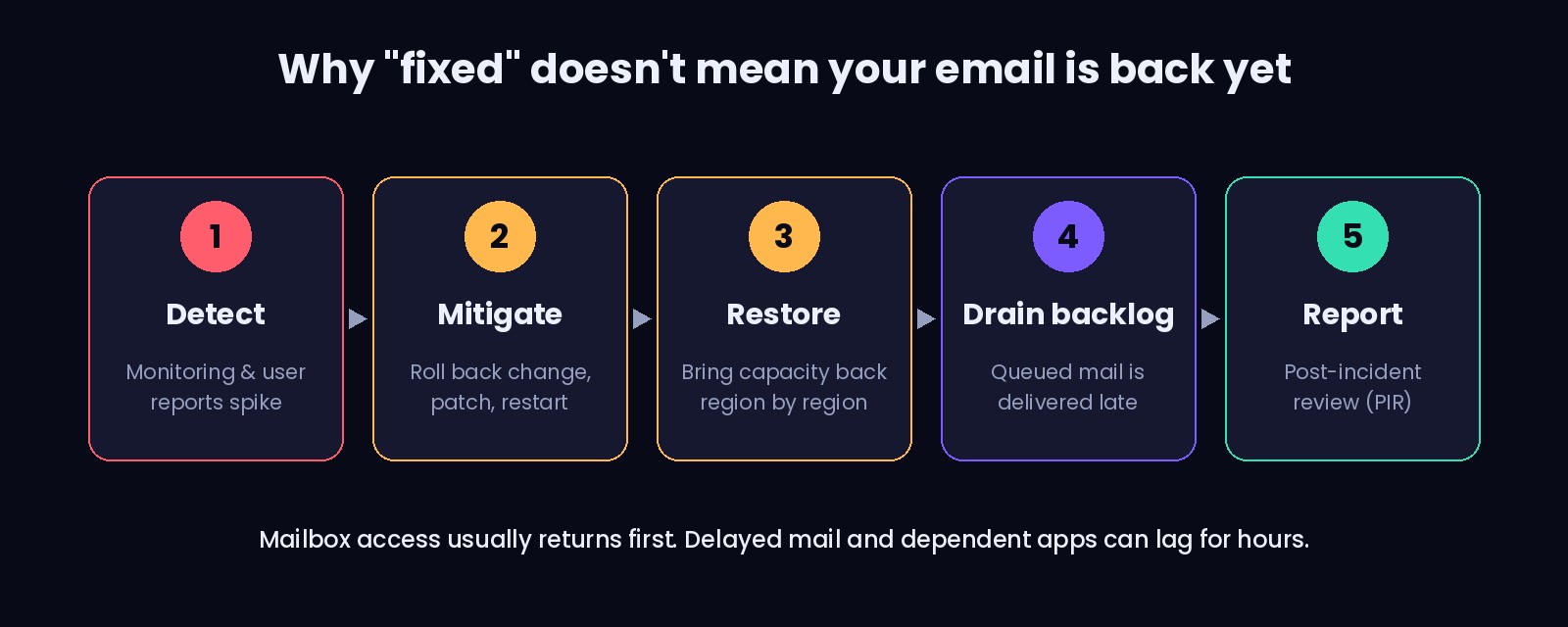
Large outages usually go through five phases:
- Detect. Monitoring and spikes in user reports confirm the problem. This usually takes minutes.
- Mitigate. Engineers find the trigger and roll it back, patch it or restart services. This is often the longest phase, because the cause isn’t obvious at first. In November, Microsoft’s explanation changed several times overnight.
- Restore gradually. Switching everything back on at once would cause a fresh overload, a “thundering herd” of reconnecting clients. In Microsoft’s words: “Given the scale of demand, we restored services gradually, validating stability at each stage.”
- Drain the backlog. Email that couldn’t be delivered was queued, not lost. Microsoft extended its retry window to 48 hours, so delayed messages arrived late rather than bouncing. Expect old emails to appear hours after your inbox opens again.
- Report. Microsoft publishes a Post-Incident Report (PIR) with the confirmed root cause, usually days later.
Rule of thumb: mailbox access usually comes back first. Missing emails, search, calendars and connected apps can lag behind for several more hours, so don’t assume the problem is over the moment Outlook opens.
Is Outlook down for everyone or just me? A 60-second check
- Microsoft 365 service status page: status.cloud.microsoft shows widespread incidents.
- Microsoft 365 Status on X: @MSFT365Status posts live updates and incident IDs.
- Admin center (for IT): Health → Service health shows incidents for your tenant. During the November outage these were EX1550543 and MO1550821.
- Crowd reports: a sudden spike on Downdetector usually confirms a wide outage.
- Quick self-test: try Outlook on the web and the mobile app. If both fail and the status pages are quiet, check your own internet connection, VPN or sign-in.
What to do during an Outlook outage
For everyday users
- Don’t keep resending. Messages are usually queued and will be delivered later. Resending creates duplicates.
- Don’t reinstall Outlook or reset your password. It’s a server-side problem, so changes on your device won’t fix it.
- Move urgent conversations to a phone call, Teams chat (if it’s working) or another agreed channel.
- Note what’s critical, so you can check that it actually arrived once service returns.
For IT teams and business owners
- Confirm the incident ID in Service health and share one clear update with staff, so the help desk isn’t flooded.
- Test access and mail flow separately. Signing in isn’t the same as email arriving. Send test messages both inside and outside the company.
- Check your integrations. Help desk, CRM and automation tools that read Microsoft mailboxes may need retries or manual catch-up.
- Use message trace after recovery to track important missing emails. Note the sender, recipient and approximate time.
- Keep evidence (affected users, timestamps with time zones, error messages) in case you need to escalate to Microsoft.
⚠ Watch out for outage scams. Attackers act fast during big outages. Security experts warned that criminals would impersonate Microsoft or internal IT with fake “restore your account” emails, calls and login pages. Microsoft won’t ask for your password to fix an outage. Check any such request through a channel you already trust.
How to protect your business from the next Microsoft 365 outage
You can’t stop Microsoft from having a bad day, but you can decide how much it affects your business.
- Have a backup communication channel. Agree in advance where your team talks if email and Teams are down, such as a group chat, a phone tree or a secondary platform.
- Give customers a second way to reach you. If email is your only support channel, an outage shuts your front door. A business WhatsApp line, live chat or phone number keeps you reachable. For example, Convo runs your WhatsApp Business number with its own inbox and automatic replies, independent of your email provider.
- Map your Microsoft dependencies. List every tool that signs in with Microsoft or reads your mailboxes. Those tools fail together.
- Monitor from the outside. Independent uptime monitoring tells you about problems quickly, even when admin pages won’t load.
- Write a one-page outage playbook covering who decides, who tells staff, what goes to customers, and how you confirm recovery.
- Train people to spot scams that follow outages. A calm, informed team is your best defence.
Frequently asked questions
Why is Outlook down right now?
Check status.cloud.microsoft or @MSFT365Status first. If Microsoft lists an active incident, the cause is on their side, and you can only wait and use backup channels. If nothing is listed, the problem is more likely your connection, account or device.
Will I lose emails during an outage?
Usually not. Sending servers queue messages and retry, and in November Microsoft extended its retry window to 48 hours. Messages normally arrive late rather than disappearing, but check critical ones with the sender or with message trace.
Why does Teams break when Outlook breaks?
Teams calendars, meeting scheduling and some Copilot features read data from Exchange Online. When Exchange is down, those features fail too, even if Teams chat still works.
Are Microsoft outages getting worse?
2026 had three major email disruptions, and the November one was the longest. As more business tools plug into Microsoft 365, each outage reaches further. That doesn’t necessarily mean Microsoft is less reliable overall, but the impact of each incident is growing.
Can I get compensation for downtime?
Microsoft 365 business plans include a financially backed uptime SLA that pays service credits when monthly uptime falls below the commitment. Your administrator has to submit a claim through the admin center. Check your agreement for the exact terms.
The bottom line
Microsoft 365 outages aren’t caused by hackers or broken hardware. They come from changes in a huge, tightly connected system, where one problem can spread to email, calendars, AI tools and every app that relies on them. You can’t prevent the next one, but with a backup channel, a short playbook and a team that knows what to expect, it becomes a minor inconvenience instead of a lost business day.
Sources
- UptimeRobot: Microsoft 365 Outage, November 2026
- TechRadar: Microsoft outage live coverage
- Computerworld: M365 services slowly come back online
- WindowsForum: Exchange Online 30-hour impact window
- The Register: January 2026 Microsoft 365 outage
- Tom’s Guide: August 31, 2026 Outlook outage
- ENow: Azure Front Door outage, October 29, 2025